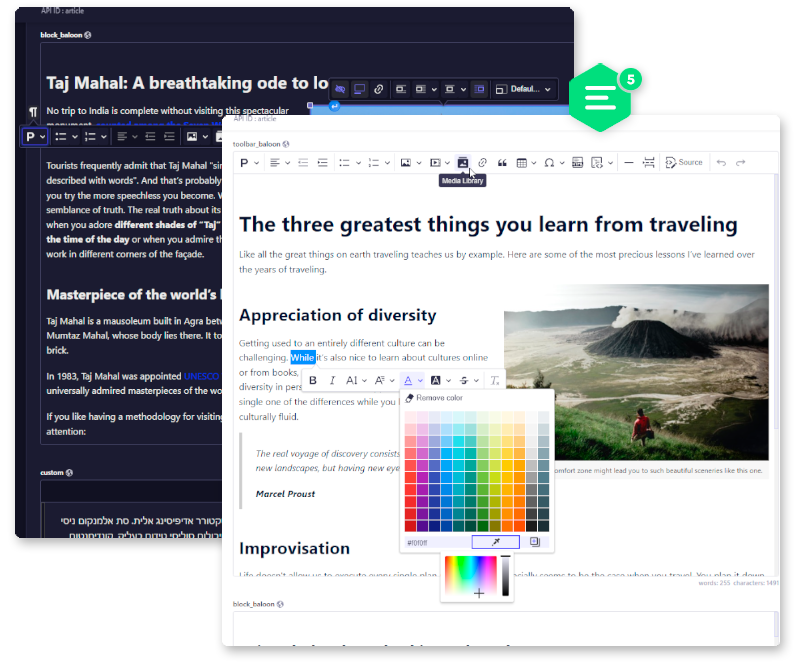
Integrates CKEditor 5 into your Strapi project as a fully customizable custom field. (Unofficial integration)
## 👋 Get Started * [Features](#features) * [Installation](#installation) * [Configuration](#configuration) * [Contributing](#contributing) * [Requirements](#requirements) ## ✨ Features * **Media library integration** * **Supports responsive images** * **Supports Strapi's theme switching with the ability to set a custom theme** * **Supports i18n and different UI translations** * **Few predefined editor configs with the ability to add custom ones** * **Possible to add new plugins** ## 🔧 Installation ___ * Inside your Strapi app, add the package: ```bash npm install @_sh/strapi-plugin-ckeditor ``` or ```bash yarn add @_sh/strapi-plugin-ckeditor ``` * Then run build: ```bash npm run build ``` or ```bash yarn build ``` ## ⚙️ Configuration ___ The plugin uses [**Strapi custom fields API**](https://docs.strapi.io/developer-docs/latest/development/custom-fields.html#registering-a-custom-field-on-the-server) and [**CKEditor dll build**](https://ckeditor.com/docs/ckeditor5/latest/installation/advanced/alternative-setups/dll-builds.html) The plugin configuration should be defined in the `/config/ckeditor.txt` file. It's highly recommended to explore [**the official ckeditor documentation**](https://ckeditor.com/docs/ckeditor5/latest/features/index.html) Content of ckeditor.txt will be passed into the script tag during the initialization process. > 📂 Default configs: [**admin/src/components/Input/CKEditor/configs**](https://github.com/nshenderov/strapi-plugin-ckeditor/blob/master/admin/src/components/Input/CKEditor/configs) > 📂 Default theme: [**admin/src/components/Input/CKEditor/theme**](https://github.com/nshenderov/strapi-plugin-ckeditor/blob/master/admin/src/components/Input/CKEditor/theme) **ckeditor.txt example:** ```js globalThis.CKEditorConfig = { /* By default custom configs and theme defined in this file are going to be spread into default configs and theme these two properties below allow you to redefine default objects completely: */ //configsOverwrite:true, //themeOverwrite:true, /* Here you can redefine default configs or add completely new ones. Each config includes: "styles", "field" and "editorConfig" properties. Property "field" is required. */ configs:{ toolbar:{ // styles:``, // field:{}, // editorConfig:{} }, custom:{ /* Styles for this specific editor version. This will be passed into the editor's parent container. */ styles:` // --ck-focus-ring:3px dashed #5CB176; // .ck.ck-content.ck-editor__editable { // &.ck-focused:not(.ck-editor__nested-editable) { // border: var(--ck-focus-ring) !important; // } // } // .ck.ck-content.ck-editor__editable.ck-rounded-corners.ck-editor__editable_inline.ck-blurred{ // min-height: 400px; // max-height: 400px; // } // .ck.ck-content.ck-editor__editable.ck-rounded-corners.ck-editor__editable_inline.ck-focused{ // min-height: 400px; // max-height: 1700px; // } `, /* Custom field option */ field: { key: "custom", value: "custom", metadatas: { intlLabel: { id: "ckeditor5.preset.custom.label", defaultMessage: "Custom version", }, }, }, /* CKEditor configuration */ editorConfig:{ /* You can find all available built-in plugins in the admin/src/components/Input/CKEditor/configs/base.js */ plugins: [ CKEditor5.autoformat.Autoformat, CKEditor5.basicStyles.Bold, CKEditor5.basicStyles.Italic, CKEditor5.essentials.Essentials, CKEditor5.heading.Heading, CKEditor5.image.Image, CKEditor5.image.ImageCaption, CKEditor5.image.ImageStyle, CKEditor5.image.ImageToolbar, CKEditor5.image.ImageUpload, CKEditor5.indent.Indent, CKEditor5.link.Link, CKEditor5.list.List, CKEditor5.paragraph.Paragraph, CKEditor5.pasteFromOffice.PasteFromOffice, CKEditor5.table.Table, CKEditor5.table.TableToolbar, CKEditor5.table.TableColumnResize, CKEditor5.table.TableCaption, CKEditor5.strapiPlugins.StrapiMediaLib, CKEditor5.strapiPlugins.StrapiUploadAdapter, ], /* By default, the language of the plugin's UI will be chosen based on the language defined in this config file or on the preferred language from the strapi's user config and if both of them are not set then 'en' will be used as a fallback. ( language.ui -> preferred language -> 'en' ) */ /* For content it will chose the language based on i18n (if! ignorei18n) or on language.content property defined here and it will use UI language as a fallback. ignorei18n ? language.content : i18n; -> language.ui */ language:{ // ignorei18n: true, // ui:'he', // content:'he' }, toolbar: [ 'heading', '|', 'bold', 'italic', 'link', 'bulletedList', 'numberedList', '|', 'strapiMediaLib', 'insertTable', '|', 'undo', 'redo' ], heading: { options: [ { model: 'paragraph', title: 'Paragraph', class: 'ck-heading_paragraph' }, { model: 'heading1', view: 'h1', title: 'Heading 1', class: 'ck-heading_heading1' }, { model: 'heading2', view: 'h2', title: 'Heading 2', class: 'ck-heading_heading2' }, { model: 'heading3', view: 'h3', title: 'Heading 3', class: 'ck-heading_heading3' }, { model: 'heading4', view: 'h4', title: 'Heading 4', class: 'ck-heading_heading4' }, ] }, image: { toolbar: [ 'imageStyle:inline', 'imageStyle:block', 'imageStyle:side', '|', 'toggleImageCaption', 'imageTextAlternative' ] }, table: { contentToolbar: [ 'tableColumn', 'tableRow', 'mergeTableCells', '|', 'toggleTableCaption' ] } } } }, /* Here you can customize the plugin's theme. This will be passed as "createGlobalStyle". */ theme:{ // common:``, // light:``, // dark:``, // additional:`` } } ``` > If you use the default (local) upload provider you should specify the `url` property in the `config/server.js` in order to get the full URL on uploaded files eg: ```js module.exports = ({ env }) => ({ url: env("PUBLIC_URL", "http://localhost:1337"), host: env('HOST', '0.0.0.0'), port: env.int('PORT', 1337), app: { keys: env.array('APP_KEYS'), }, }); ``` > In order to display a content from an external source in your `admin` you should configure your middlewares.js [**check the docs about this**](https://docs.strapi.io/developer-docs/latest/setup-deployment-guides/configurations/required/middlewares.html) ## How to add plugins ___ Markdown plugin example * Inside your app: ```js yarn add @ckeditor/ckeditor5-markdown-gfm ``` or ```js npm install @ckeditor/ckeditor5-markdown-gfm ``` * your-app/src/admin/**app.js** ```js import ckeditor5Dll from "ckeditor5/build/ckeditor5-dll.js"; import ckeditor5MrkdownDll from "@ckeditor/ckeditor5-markdown-gfm/build/markdown-gfm.js"; const config = {}; const bootstrap = (app) => {}; export default { config, bootstrap, }; ``` * your-app/config/**ckeditor.txt** ```js globalThis.CKEditorConfig = { configs:{ markdown:{ field: { key: "markdown", value: "markdown", metadatas: { intlLabel: { id: "ckeditor.preset.markdown.label", defaultMessage: "Markdown version", }, }, }, editorConfig:{ placeholder: 'Markdown editor', plugins: [ CKEditor5.essentials.Essentials, CKEditor5.autoformat.Autoformat, CKEditor5.blockQuote.BlockQuote, CKEditor5.basicStyles.Bold, CKEditor5.heading.Heading, CKEditor5.image.Image, CKEditor5.image.ImageCaption, CKEditor5.image.ImageStyle, CKEditor5.image.ImageToolbar, CKEditor5.image.ImageUpload, CKEditor5.indent.Indent, CKEditor5.basicStyles.Italic, CKEditor5.link.Link, CKEditor5.list.List, CKEditor5.mediaEmbed.MediaEmbed, CKEditor5.paragraph.Paragraph, CKEditor5.table.Table, CKEditor5.table.TableToolbar, CKEditor5.sourceEditing.SourceEditing, CKEditor5.strapiPlugins.StrapiMediaLib, CKEditor5.strapiPlugins.StrapiUploadAdapter, CKEditor5.markdownGfm.Markdown, CKEditor5.basicStyles.Code, CKEditor5.codeBlock.CodeBlock, CKEditor5.list.TodoList, CKEditor5.basicStyles.Strikethrough, CKEditor5.horizontalLine.HorizontalLine ], toolbar: { items: [ 'heading', '|', 'bold', 'italic', 'strikethrough', 'link', '|', 'bulletedList', 'numberedList', 'todoList', '|', 'code', 'codeBlock', '|', 'uploadImage', 'strapiMediaLib', 'blockQuote', 'horizontalLine', '-', 'sourceEditing', '|', 'outdent', 'indent', '|', 'undo', 'redo' ], shouldNotGroupWhenFull: true }, image: { toolbar: [ 'imageStyle:inline', 'imageStyle:block', 'imageStyle:side', '|', 'toggleImageCaption', 'imageTextAlternative' ] }, codeBlock: { languages: [ { language: 'css', label: 'CSS' }, { language: 'html', label: 'HTML' }, { language: 'javascript', label: 'JavaScript' }, { language: 'php', label: 'PHP' } ] }, } } } } ``` * Then rebuild your app: ```bash npm run build ``` or ```bash yarn build ``` ## 🛠 Contributing ___ This section covers the way how to configure your environment if you want to contribute to this package. ### Setting up the environment In order to start making changes in the plugin you first need to install Strapi infrastructure on top of the plugin repository. ``` npx create-strapi-app --quickstart strapi cd strapi ``` By default Strapi does not create plugins folder so we need to create it. ``` mkdir -p src/plugins ``` Now we should clone this repository so we can work on it. ``` git clone git@github.com:nshenderov/strapi-plugin-ckeditor.git src/plugins/strapi-plugin-ckeditor ``` Let's add an entry inside `./package.json` file so, we won't need to use `yarn` inside plugin itself. ``` "workspaces": ["./src/plugins/strapi-plugin-ckeditor"] ``` Install dependencies: ``` yarn install ``` Now we need to register plugin so strapi can use it. In order to do that we need to create (if not already created) `./config/plugins.js` file and add entry to it. ``` module.exports = ({ env }) => ({ ckeditor5: { enabled: true, resolve: "./src/plugins/strapi-plugin-ckeditor" }, }); ``` Rebuild the project and start the server: ``` yarn build yarn develop ``` ## ⚠️ Requirements ___ Strapi **v4.13.0+** Node **>=18.0.0 <=20.x.x**